
Matroska vs MP4: Which Format Fits Your OTT Platform?
A container choice that looks harmless in a content spreadsheet can become a playback problem at launch. An MKV master may preserve every language track and styled subtitle perfectly, yet the same file may trigger conversion before it reaches a browser, phone, or television. An MP4 may move more easily through the delivery chain, but the extension alone does not prove that its codecs, captions, or timing will work on your target devices.
For Matroska vs MP4, the practical answer is: use Matroska when flexible preservation of complex source assets is the priority, and use MP4-based packaging when broad playback and adaptive OTT delivery are the priority. Neither container is inherently higher quality or smaller. The codecs, bitrates, track selection, and packaging workflow determine those outcomes.
This guide compares the formats from an OTT operator's perspective: ingest, archive, localization, transcoding, HLS/DASH packaging, and multi-device playback.
Matroska vs MP4: the short answer
Matroska, commonly stored as .mkv, is a flexible open media container. It is particularly useful for keeping video, several audio languages, subtitles, chapters, fonts, and metadata together in one source asset. The official Matroska specification describes it as an audiovisual container—not a compression format—and lists selectable tracks, chapters, tags, extensibility, error resilience, and network streaming among its capabilities.
MP4 is the file format defined by MPEG-4 Part 14 and derived from the ISO Base Media File Format, as summarized by ISO/IEC 14496-14:2020. Its strength is not that it creates better pictures. Its strength is a mature ecosystem across encoders, packagers, browsers, mobile devices, televisions, CDNs, and editing tools.
For an OTT platform, the most reliable rule is not “keep everything as MKV” or “convert everything to MP4.” It is:
- accept the source container that preserves the required assets;
- inspect the streams inside it;
- normalize or transcode only what the playback contract requires; and
- package delivery outputs for HLS and/or MPEG-DASH rather than serving a single source file as the whole streaming strategy.
Matroska vs MP4 comparison for streaming teams
| Decision factor | Matroska (MKV) | MP4 | OTT implication |
|---|---|---|---|
| Primary strength | Flexible, feature-rich storage | Broad ecosystem compatibility | MKV often fits source preservation; MP4 often fits processing and delivery |
| Video quality | Determined by the video codec and settings | Determined by the video codec and settings | The container alone does not change picture quality |
| File size | Driven mainly by encoded streams and extra tracks | Driven mainly by encoded streams and extra tracks | Compare like-for-like streams, not extensions |
| Audio and subtitles | Strong support for many track and subtitle types | Supports multiple tracks, but player and workflow support varies by format | Validate every language, caption, and accessibility track |
| Chapters and attachments | Rich chapter, tag, and attachment model | Supports metadata and timed structures through its ecosystem | Do not assume every downstream player exposes every feature |
| Browser and device reach | Native support is inconsistent | MP4 is broadly recognized, subject to codec support | MP4 reduces container friction but does not guarantee decoding |
| Adaptive streaming | Matroska can be streamed, but raw MKV is not the usual HLS/DASH delivery package | Fragmented MP4 is widely used by HLS, DASH, and CMAF workflows | Package outputs; do not confuse a downloadable file with an ABR stream |
| Best default role | Complex ingest asset or preservation copy | Interchange, mezzanine, progressive download, and fragmented delivery | Use different containers at different workflow stages if needed |
Quality: the codec matters more than the container
MKV and MP4 are wrappers around encoded streams. If both files contain the same H.264 video, AAC audio, and timing without re-encoding, the visible and audible quality is the same. A larger MKV often contains more audio tracks, lossless audio, subtitles, or attachments; that does not mean Matroska inherently produces better video.
This distinction also clears up adjacent terms. HEVC means High Efficiency Video Coding, also called H.265: it is a video codec. AAC audio is an encoded audio format. Matroska and MP4 are containers that can carry compatible encoded streams. Resolution is another separate property, so a container choice does not turn an HD source into 2K video resolution.
Even video/mp4 is incomplete compatibility information. MDN's guide to codecs in common media types explains that the container MIME type does not identify the actual media codec inside. Your acceptance test must cover the combination: container, video codec and profile, audio codec, captions, encryption, and device.
File size: compare the same streams
Container overhead is usually not the deciding factor in an OTT storage bill. Video bitrate, audio bitrate, duration, resolution, frame rate, codec efficiency, and the number of renditions or alternate tracks dominate file size.
To make a fair comparison, remux the same streams into each compatible container without transcoding and compare the results. Comparing a multi-language MKV master with a single-audio MP4 delivery file answers a different question: how much content is inside each file.
Tracks, subtitles, and metadata
Matroska's track and attachment model is valuable when a distributor delivers several dubs, commentary, descriptive audio, forced subtitles, full subtitles, chapters, and fonts for styled captions. RFC 9559, the IETF specification for Matroska, defines track metadata such as language and type, as well as chapters and other container structures.
MP4 can also carry multiple media tracks and timed text, but compatibility depends on the exact format and the rest of the delivery stack. The safest workflow is to inventory every source track and explicitly map it to the output representation, language code, role, and default/forced behavior. A successful video transcode is still a failed migration if it silently drops an accessibility track.
How Matroska vs MP4 fit an OTT workflow
The phrase “best format for streaming” hides at least three different jobs. A container that is excellent for receiving or preserving content does not have to be the same container delivered to viewers.
1. Ingest: preserve first, then inspect
At ingest, accept a source only after probing it. Record the container, video and audio codecs, profile and level, resolution, frame rate, scan type, color metadata, channel layout, languages, subtitles, duration, and time-base consistency.
This is also where the interlaced meaning matters: interlacing describes how picture fields are scanned, not which container holds them. An interlaced source may require a deliberate deinterlacing step before progressive device delivery. Renaming .mkv to .mp4 changes none of that.
Matroska can be a sensible ingest format when it prevents complex tracks from being split across loosely named sidecar files. MP4 can be a sensible ingest format when partners already deliver a validated, well-supported codec combination. In both cases, reject malformed timing and undocumented tracks early rather than discovering them during playback QA.
2. Archive or mezzanine: keep what you may need later
Your preservation copy should retain enough information to create future outputs without returning to the rights holder. That may include the highest-quality video, original audio, dubs, captions, subtitle assets, chapter markers, and provenance metadata.
Matroska is attractive for a self-contained preservation asset because of its flexible track and attachment support. MP4 may be preferable when your media asset management, editing, quality-control, and cloud-transcoding systems standardize on an ISO BMFF workflow. The operationally correct choice is the one your tools can validate, reproduce, and migrate—not merely the one with the longer feature list.
Keep preservation separate from distribution. A future codec or device requirement should trigger a new derivative from the best available source, not a re-encode of a low-bitrate delivery copy.
3. Delivery: package for adaptive playback
For OTT delivery, a single .mp4 download is not the same thing as an adaptive stream. HLS and MPEG-DASH use manifests plus addressable media segments so the player can switch among renditions as bandwidth and device conditions change. The m3u8 file format is the playlist layer in HLS; it points to media rather than acting as the video container itself.
Apple's current HLS authoring specification lists fragmented MP4 media initialization and segments alongside MPEG transport streams, and defines continuity and segment-boundary requirements. DASH-IF's current interoperability guidance likewise constrains DASH delivery around CMAF-formatted media, which is based on ISO BMFF.
That is why “MP4 for streaming” needs a qualifier. A normal standalone MP4, a fragmented MP4, and CMAF segments are related but not interchangeable deployment labels. The packager must create aligned renditions, initialization data, manifests, audio and subtitle groups, encryption signaling, and segment boundaries that the target player understands. See the broader live streaming player requirements when the decision also involves protocols, DRM, captions, and device QA.
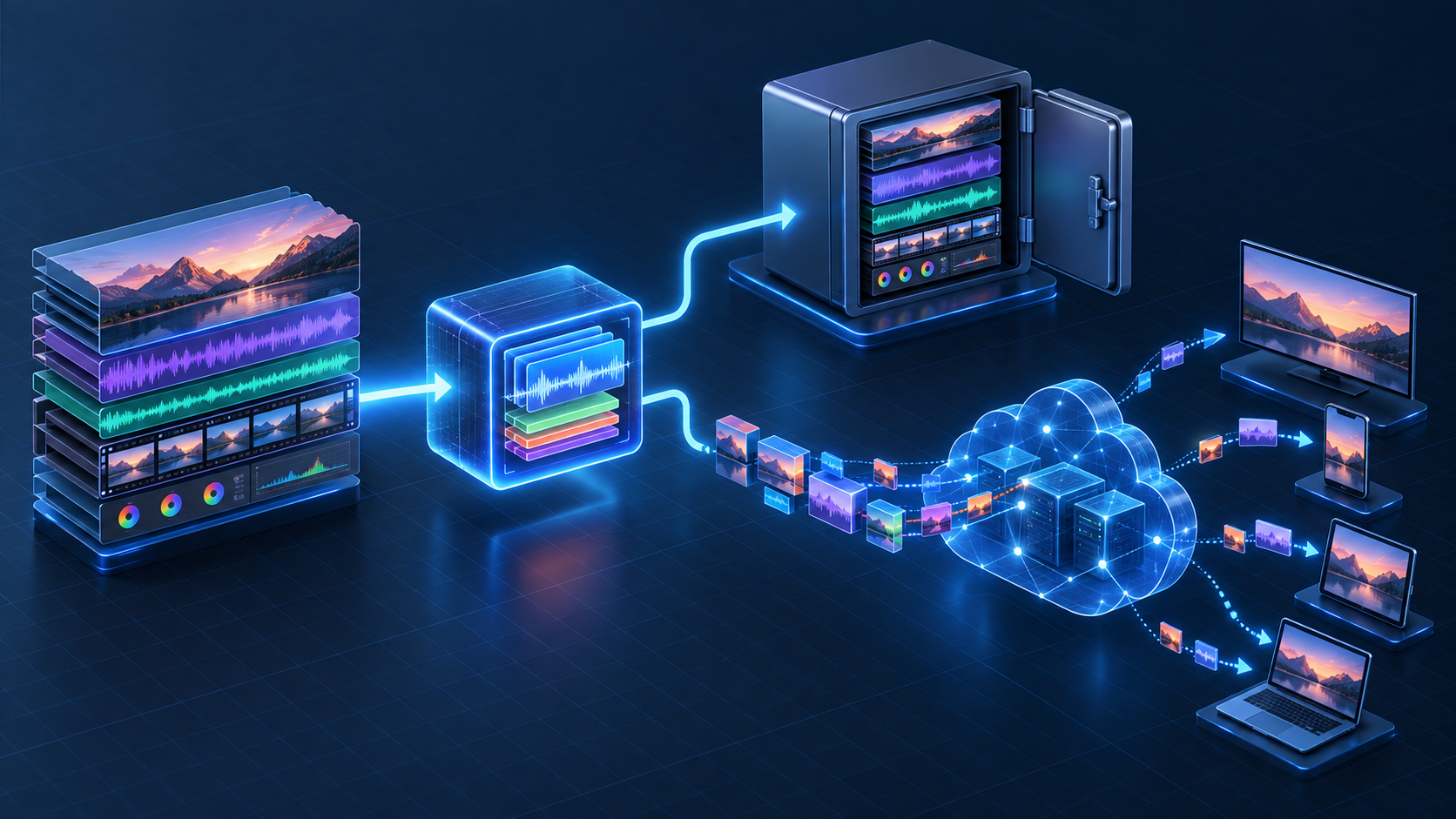
How to choose Matroska vs MP4 for your platform
Treat the choice as a workflow decision, not a vote between extensions.
Step 1: define the playback contract
List the browsers, mobile operating systems, TV platforms, casting targets, and minimum device generations you support. For each one, document the accepted combinations of container or segment format, codec, profile, audio layout, captions, and DRM.
MDN recommends MP4 when only one broadly available video container can be offered, but its container guide also warns that container selection depends on codecs and intended use. Turn that general advice into a device matrix for your own audience.
Step 2: define the asset-retention contract
Decide which source elements are mandatory to preserve:
- original and alternate video tracks;
- stereo, surround, dubbed, commentary, and audio-description tracks;
- full, forced, SDH, and closed-caption tracks;
- language and accessibility labels;
- chapters, cue points, artwork, and rights metadata; and
- original checksums and source provenance.
If your current MP4 pipeline cannot preserve or map a required asset, do not discard it to simplify ingest. Keep a preservation master and derive compliant delivery outputs from it.
Step 3: choose remuxing or transcoding deliberately
Remuxing changes the container while copying compatible encoded streams. Transcoding decodes and re-encodes at least one stream. The official FFmpeg documentation describes streamcopy with -c copy as fast and quality-preserving because it performs no decoding or encoding, while noting that it can fail when the target container cannot represent required source information.
Use remuxing when the video, audio, subtitles, and metadata are compatible with the target and already meet the playback contract. Transcode when the codec, profile, bitrate, resolution, frame rate, audio layout, or delivery ladder must change. Convert or externalize subtitle formats only after confirming that styling, timing, forced flags, and language labels survive.
Step 4: automate inspection and fail loudly
A scalable pipeline should not infer media behavior from .mkv or .mp4. Probe every input, compare it with a declared specification, and route it to pass-through, remux, transcode, manual review, or rejection.
RentAnOTT is relevant when that media decision sits inside a larger launch requirement: branded web and native apps, an enterprise CMS, adaptive streaming, multi-language playback, DRM, monetization, and managed infrastructure. Instead of treating the container as an isolated upload setting, the platform can be evaluated against the complete content-to-viewer workflow and the devices the service intends to support.
Step 5: validate outputs on real playback paths
Automated checks should confirm duration, track counts, timestamps, keyframe alignment, segment continuity, manifest references, encryption signaling, and decode success. Human and device tests should cover seeking, bitrate switches, language changes, forced subtitles, captions, casting, picture-in-picture, background/foreground transitions, and licence renewal.
Test the hardest assets, not a clean trailer with one audio track. Include long-form titles, variable frame rate, interlaced sources, HEVC, surround audio, multiple subtitle types, non-Latin metadata, and files with unusual start timestamps.
Common Matroska vs MP4 mistakes
Renaming the extension
Changing movie.mkv to movie.mp4 does not rewrite the container. A player may trust the extension or MIME type, attempt to parse the wrong structure, and fail. Use a media tool to remux or transcode, then verify the output.
Assuming MP4 always plays everywhere
MP4 has broad container support, but an unsupported codec, high profile or level, audio format, pixel format, subtitle type, or DRM combination can still fail. Compatibility belongs to the complete media tuple, not the suffix.
Transcoding when remuxing is enough
Unnecessary re-encoding consumes compute, takes longer, and can reduce quality. Probe first. If the encoded streams already meet requirements and the target container supports them, streamcopy may solve the problem.
Losing tracks during conversion
Many tools choose a default video and audio stream unless mapping is explicit. Compare the source and output manifests, track counts, language labels, default flags, and subtitle behavior. Preserve a source master before any destructive normalization.
Delivering a source file instead of a streaming package
Progressive MP4 playback can be useful, but it is not a substitute for a tested adaptive bitrate ladder when you need resilient playback across varied networks. Package HLS/DASH outputs, publish the correct MIME types, and verify CDN and player behavior end to end.
Frequently asked questions
Is Matroska better than MP4?
Matroska is better for flexible, self-contained storage of complex media assets; MP4 is usually better for broad interchange and common OTT packaging workflows. Neither is universally better. Choose by workflow stage, required tracks, tooling, and target devices.
Does MKV have better quality than MP4?
No. When MKV and MP4 contain the same encoded video and audio streams, the container does not create a quality difference. Codec, bitrate, resolution, source quality, and encoding settings determine fidelity.
Is MKV or MP4 better for streaming?
MP4-based fragmented packaging is the more common choice for HLS, DASH, and CMAF delivery. Matroska can be useful at ingest or for preservation, but an OTT service should create validated adaptive packages rather than assume a raw MKV or standalone MP4 is ready for every player.
Does converting MKV to MP4 lose quality?
Not when compatible streams are remuxed without re-encoding. Quality can change when conversion transcodes video or audio. Subtitles, attachments, chapters, and metadata may also need mapping or may not have a direct target representation, so validate more than the picture.
Are MKV files larger than MP4 files?
Not inherently. With identical encoded streams, sizes should be similar. Real-world MKV files may be larger because they often contain additional audio, subtitle, chapter, or attachment data.
Can browsers play Matroska files directly?
Support varies by browser, operating system, codec, and how the media is delivered. Do not use one successful desktop test as proof of audience-wide support. Validate your device matrix or package browser delivery through a supported HLS/DASH path.
Conclusion
The right Matroska vs MP4 decision is usually a division of labor. Keep Matroska when it is the safest way to preserve a complex, multitrack source. Use MP4 and fragmented ISO BMFF packaging where your encoding, HLS/DASH, DRM, CDN, and playback ecosystem require it. Remux when streams are already compatible; transcode only when the playback contract demands a media change.
Before locking the pipeline, run representative catalog assets through ingest, packaging, and real-device playback. If you are evaluating the full platform as well as the file workflow, request a demo with your hardest source title and target-device list so the decision is tested against the service you actually plan to launch.